API Getting Started
The Closed Caption Converter API is a REST API that provides programmatic access to the full conversion engine, including format conversion, automatic conform workflows, transcription, machine translation, and delivery. Every feature available in the web application is accessible via the API, plus additional capabilities enabled by Access Providers.
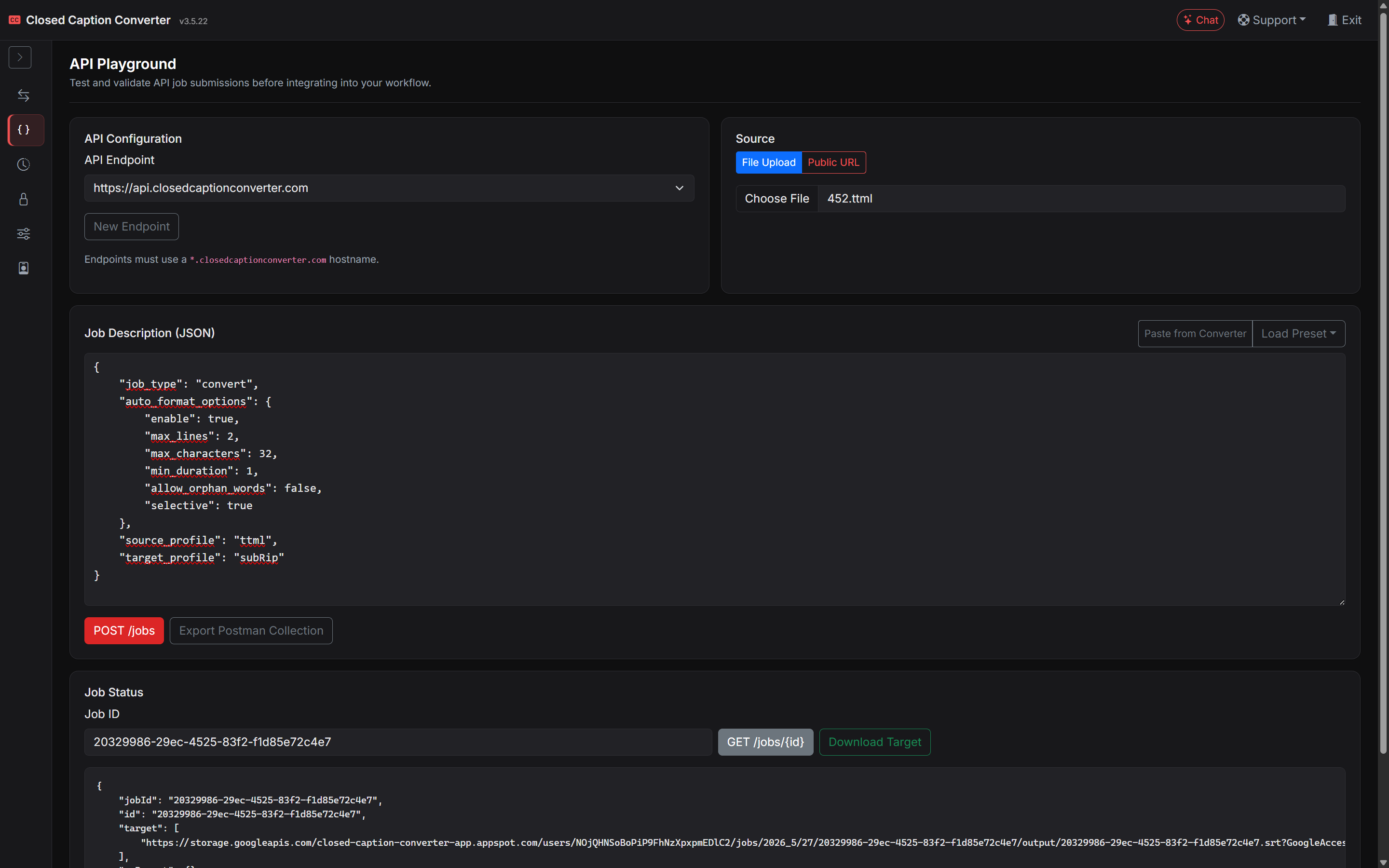
Base URL
All API requests are made to:
https://api.closedcaptionconverter.com
If your team has been provisioned with a client-specific staging or production endpoint, use the URL supplied for that environment instead of the public default above.
Authentication
Every request to the /jobs endpoints must include two headers:
x-api-key: YOUR_API_KEY
username: you@example.com
| Header | Description |
|---|---|
x-api-key | Your API key. |
username | The email address of the Closed Caption Converter account that owns the key. |
Requests missing either header are rejected with 401. Postman collections exported from the app include both headers.
To generate an API key, sign in to the web application, open Account & Billing in the left sidebar, select the API Keys tab, and click Generate Key. Each account has one active key at a time; generating a new key replaces the previous one. API keys are not available during the free trial.

Keep your API key secure. Do not include it in client-side code or commit it to version control. If a key is compromised, generate a new key from Account & Billing → API Keys immediately.
For interactive testing without writing code, use the API Playground workspace.
Endpoints
| Method | Path | Auth | Description |
|---|---|---|---|
POST | /jobs | Yes | Submit a job (convert, QC, translate, transcribe, align, deliver). |
GET | /jobs/{id} | Yes | Get a job's status and download links. Use this to poll asynchronous jobs. |
DELETE | /jobs/{id} | Yes | Delete a job and its stored source and output files. |
GET | /help/profiles/source | No | JSON array of every supported source (read) profile name. |
GET | /help/profiles/target | No | JSON array of every supported target (write) profile name. |
GET | /help/profiles/all | No | Mapping of profile IDs to display names. |
GET | /help/profiles/extensions | No | Source and target profiles grouped by file extension. |
GET | /help/profiles/default-extensions | No | Default file extension for each profile. |
GET | /help/profiles/encodings | No | Default character encoding for each profile. |
GET | /help/schemas/job | No | A complete Job Description object with every field set to its default value. |
Profile names in a Job Description must match a supported profile exactly. If you are unsure of a name, request /help/profiles/source or /help/profiles/target rather than guessing.
Your First Request
The primary endpoint for submitting caption processing jobs is POST /jobs. The request body is a multipart/form-data payload with the following fields:
| Field | Type | Description |
|---|---|---|
source | File or URL string | The source caption file, either uploaded as binary data or provided as a public HTTPS URL. Uploads are limited to 20 MB. |
sources | URL strings | Multiple source URLs, for multi-source jobs such as merge or Segmentation & Conform. Repeat the field once per URL. |
config | JSON string | The Job Description object that instructs the API what to do with the source file. Required unless preset_id is supplied. |
preset_id | string | Optional. The ID of a saved Job Preset. Fields in config override the preset's values. |
You do not need to include every possible conversion parameter in config. Omitted values use the engine defaults or the selected profile defaults.
The following example converts a SubRip (SRT) file to WebVTT using curl:
curl -X POST https://api.closedcaptionconverter.com/jobs \
  -H "x-api-key: YOUR_API_KEY" \
  -H "username: you@example.com" \
  -F "source=@/path/to/input.srt" \
  -F 'config={
    "job_type": "convert",
    "source_profile": "SubRip Video Subtitle Script",
    "target_profile": "WebVTT",
    "default_frameRate": 29.97
  }'
The Job Response
Every successful POST /jobs returns 200 with a JSON object. The output file is not embedded in the response; download it from the signed URL in target:
{
  "jobId": "1b0e6f1a-6a7e-4c1e-9d0b-3f5f7c2a9e11",
  "id": "1b0e6f1a-6a7e-4c1e-9d0b-3f5f7c2a9e11",
  "target": "https://storage.googleapis.com/...signed-url.../1b0e6f1a-6a7e-4c1e-9d0b-3f5f7c2a9e11.vtt",
  "qcReport": false,
  "qc_status": null,
  "qc_errors": null,
  "status": "passed",
  "statusMsg": "Job completed successfully",
  "warning": "",
  "progress": 100
}
| Field | Description |
|---|---|
id / jobId | The job ID. Both fields contain the same value. |
target | A signed HTTPS URL for the output file, or false when the job has not finished yet. |
qcReport | The QC report object when QC is enabled, otherwise false. See Automatic QC Tests for its structure. |
qc_status | pass, warn, or fail when QC ran, otherwise null. See QC status. |
qc_errors | Total number of QC errors found, or null when QC did not run. |
status | passed when the job finished, queued or in progress while it is still running, failed on error. |
statusMsg | A human-readable status message. |
warning | Present on some convert jobs. Non-empty when an output file was produced despite a problem (for example, no events could be decoded). |
progress | Completion percentage from 0 to 100. |
Asynchronous Jobs
Most convert, qc, and translate jobs complete within the request and return status: "passed". Long-running work returns immediately with status: "queued" or status: "in progress" and target: false:
transcribejobs, andalignjobs that require transcription- Very large files written to some target formats, which are processed in a background queue
For these jobs, poll GET /jobs/{id} until status is passed (then download target) or failed (then read statusMsg). A polling interval of 5–15 seconds is reasonable.
curl https://api.closedcaptionconverter.com/jobs/JOB_ID \
  -H "x-api-key: YOUR_API_KEY" \
  -H "username: you@example.com"
GET /jobs/{id} returns the stored job record, including status, statusMsg, progress, the job config as a JSON string, and signed download URLs in target and source when those files exist.
Deleting a Job
DELETE /jobs/{id} removes the job's stored source, output, and transcript files and marks the job as deleted:
{
  "jobId": "1b0e6f1a-6a7e-4c1e-9d0b-3f5f7c2a9e11",
  "id": "1b0e6f1a-6a7e-4c1e-9d0b-3f5f7c2a9e11",
  "deleted": true,
  "deletedFiles": 2
}
Submitting a Job from a URL
If your source file is hosted at a public HTTPS URL (or a pre-signed URL for private cloud storage), you can pass the URL string in the source field instead of uploading the file directly:
curl -X POST https://api.closedcaptionconverter.com/jobs \
  -H "x-api-key: YOUR_API_KEY" \
  -H "username: you@example.com" \
  -F "source=https://your-bucket.s3.amazonaws.com/captions/input.srt" \
  -F 'config={
    "job_type": "convert",
    "source_profile": "SubRip Video Subtitle Script",
    "target_profile": "EBU STL"
  }'
Submitting a JSON Body
When your sources are URLs, you can send Content-Type: application/json instead of multipart form data. The request body is the Job Description itself, with the source URL in source (or an array of URLs in sources) and an optional preset_id:
curl -X POST https://api.closedcaptionconverter.com/jobs \
  -H "x-api-key: YOUR_API_KEY" \
  -H "username: you@example.com" \
  -H "Content-Type: application/json" \
  -d '{
    "job_type": "convert",
    "source": "https://your-bucket.s3.amazonaws.com/captions/input.srt",
    "source_profile": "SubRip Video Subtitle Script",
    "target_profile": "WebVTT"
  }'
Using a Preset
If you have saved a Job Preset in the Job Presets workspace, you can reference it by ID instead of passing a full config object. Closed Caption Converter will retrieve the stored Job Description and apply it to your source file:
curl -X POST https://api.closedcaptionconverter.com/jobs \
  -H "x-api-key: YOUR_API_KEY" \
  -H "username: you@example.com" \
  -F "source=@/path/to/input.srt" \
  -F "preset_id=your-preset-id"
See API — Presets for details on creating and managing presets.
Postman Collection
A Postman collection is available directly from the Closed Caption Converter web application:
- Subtitle Converter — configure your job, open the Job Description button in the page header, and click Download Postman Collection.
- API Playground — configure your endpoint, source, and job description, then click Export Postman Collection.
Both exports include pre-configured requests for file upload and URL-based submissions using your current API key, username header, and job configuration, and can be imported directly into Postman or any compatible REST client.
Building with AI
To give an AI coding assistant the full API reference as plain markdown, see Build with AI.
Errors & Rate Limits
The API uses standard HTTP status codes. Error responses have a plain-text body describing the problem, not JSON.
| Status | Meaning | Example body |
|---|---|---|
400 | Malformed request, invalid configuration, or the job failed during processing. | No configuration found in request. |
401 | Missing headers, or the API key does not match the username. | Invalid credentials |
404 | The job ID does not exist or has been deleted. | Job not found. |
429 | Too many failed authentication attempts. Wait for the number of seconds in the Retry-After header before retrying. | Too many requests |
500 | Unexpected server error. | Internal server error |
A job that fails after it has been accepted (for example, an asynchronous transcription) is reported through GET /jobs/{id} with status: "failed" and the reason in statusMsg.