API Playground
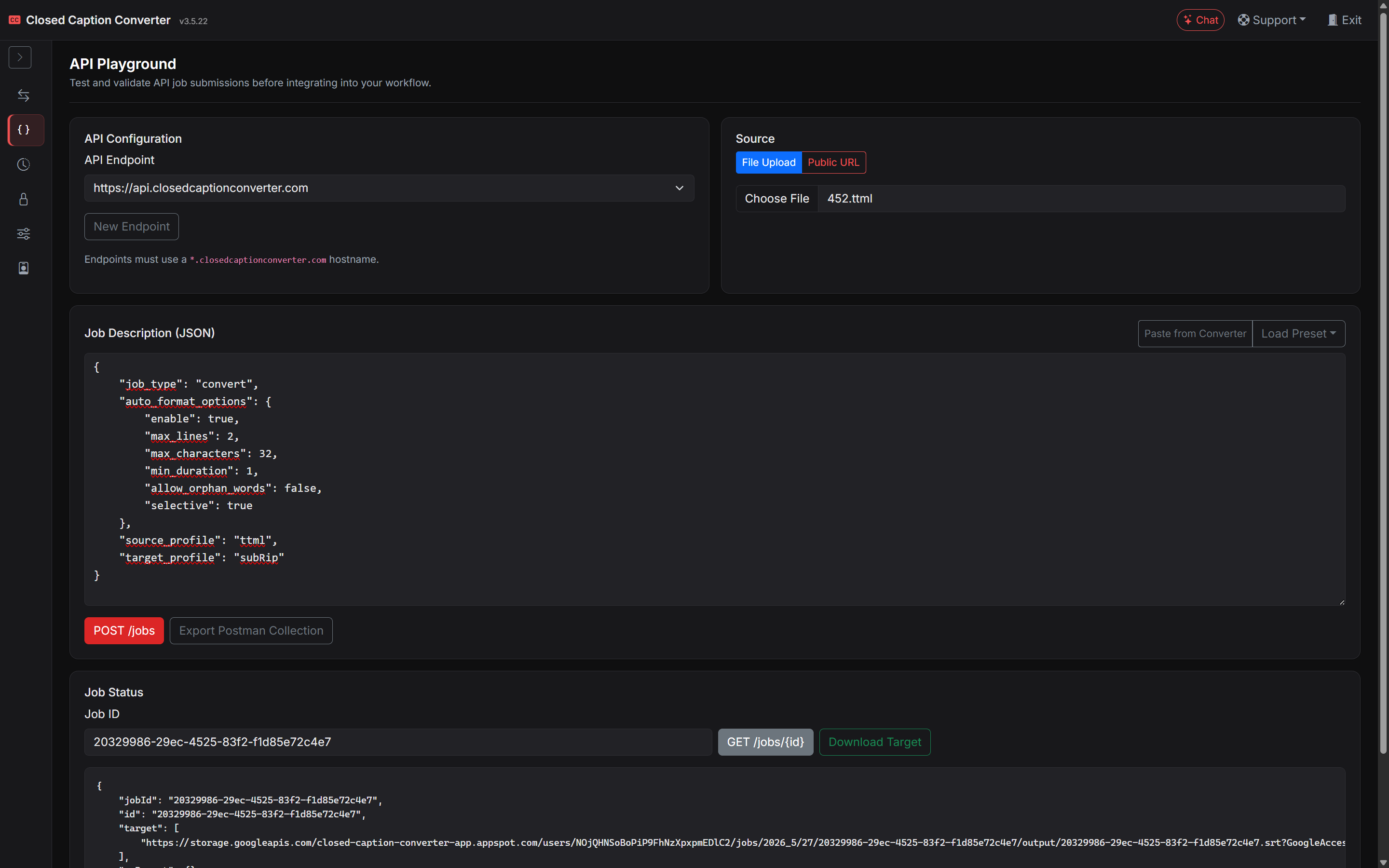
The API Playground workspace lets you submit and inspect API jobs from the browser without writing integration code first. Open it from the left Workspaces sidebar after signing in to app.closedcaptionconverter.com.
Before you start
- Subscription: API Playground requires an active (non-trial) subscription. Trial accounts see a message that API access is not available.
- API key: The playground loads your API key automatically when you have API access. You can also view or regenerate it under Account & Billing → API Keys.
- Billing: Successful API jobs may incur usage charges (currently $0.10 per successful job). A billing notice appears at the top of the playground until dismissed.
API endpoint
Choose the base URL for your requests. The default is:
https://api.closedcaptionconverter.com
If your organization uses a dedicated endpoint (for example https://nbc-staging-api.closedcaptionconverter.com), select it from the dropdown or add a custom hostname. Only hostnames ending in .closedcaptionconverter.com are accepted. Saved endpoints are stored in your browser's local storage and appear in the dropdown for future sessions.
Submitting a job
- Select a source: upload a caption file from your computer, or enter a publicly accessible URL.
- Edit the Job Description (JSON) in the text area, or use:
- Paste from Converter — copies the current configuration from the Subtitle Converter workspace.
- Load Preset — inserts a
preset_idreference for a preset from Job Presets.
- Click POST /jobs to submit. The JSON response appears below, including the job
id. - Enter the job ID and click GET /jobs (with that ID) to poll status and retrieve output when complete.
- When the job has finished, use Download Target to save the output file.
Postman collection
Click Export Postman Collection to download a collection pre-filled with your current endpoint, API key, source settings, and job description. Import it into Postman or any compatible REST client.
You can also export a Postman collection from the Subtitle Converter workspace via the Job Description modal.
Next steps
| Topic | Description |
|---|---|
| API — Getting Started | Authentication, curl examples, and error handling. |
| API — Job Types & Descriptions | Full Job Description schema. |
| Job Status Dashboard | Audit trail, filters, and per-job actions for submitted jobs. |