Chat & Support
Closed Caption Converter offers multiple ways to get help, from an AI assistant built directly into the application to 1-on-1 developer support from the team.
AI Assistant
The Closed Caption Converter web application includes a built-in AI Assistant, accessible from the Chat button in the top bar. Click Chat to open the resizable panel on the right side of the screen.
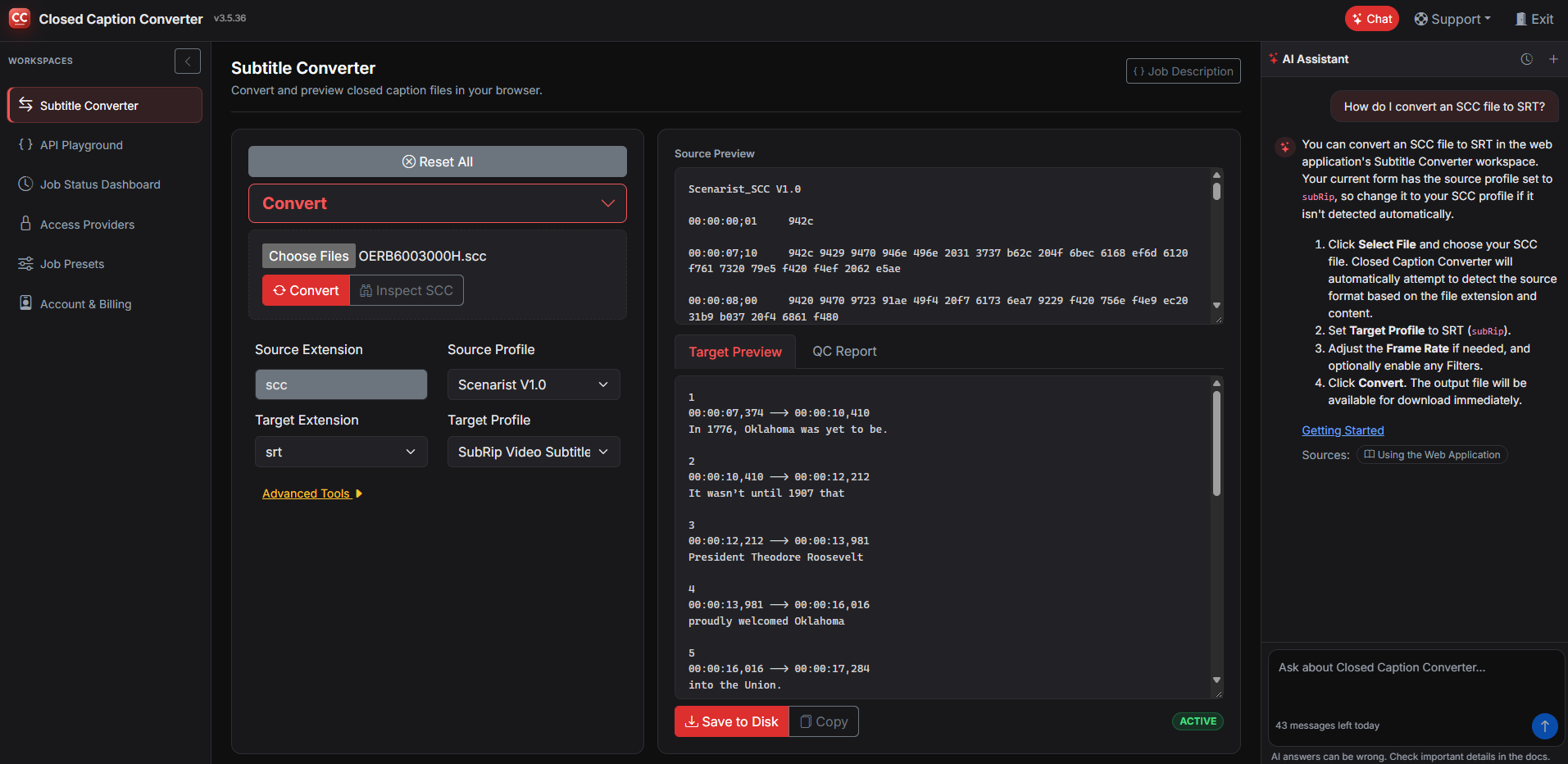
The assistant answers questions about profiles, filters, encoding and decoding options, Job Description syntax, the API and CLI, presets and Access Provider configuration. Answers are based on this documentation, and the pages an answer draws on are listed under it as Sources.
The assistant also knows what you are working on, so you can ask about it directly:
- The current page and converter settings, for example "What target format am I set to?" or "Will this embed the captions?"
- Your most recent jobs, including their status and any error message, for example "Why did my last job fail?"
- Your subscription status, for example "When does my trial end?"
It never sees the contents of your caption or media files.
The assistant is read-only. It explains how to make a change but cannot change your settings, run or retry jobs, or modify your account.
Chat history
Chats are saved in your browser. Click the history icon in the panel header to search, rename or delete past chats, or the + icon to start a new one. Chats are not synced between browsers or devices.
Daily message limit
The assistant is available to all subscribers. Trial accounts can send 15 messages per day and paid subscriptions 50 messages per day. The limit resets at midnight UTC, and the number of messages left is shown under the message box.
Tips
- AI answers can be wrong. Check important details against the linked documentation.
- Press Enter to send and Shift+Enter for a new line. Click Stop to cancel an answer.
The Support menu in the top bar also links to this documentation (User Guide) and the contact page.
Sales & Developer Support
The Closed Caption Converter team provides direct support for API integration, workflow design, Access Provider configuration, and CLI deployment questions. Developer support is included with all API subscriptions and available to free trial users during the 7-day trial period.
To reach the support team, visit the Contact Us page. Response times are typically within one business day, with same-day responses available for active API subscribers with complex integration questions.
Free Trial
If you are evaluating Closed Caption Converter and would like to test the API, CLI, or Access Providers before committing to a subscription, a 7-day free trial. The trial includes access to all features and 1-on-1 developer support.
Additional Resources
| Resource | Description |
|---|---|
| Pricing | Subscription plans and API rate limits. |
| Features Overview | High-level overview of all platform capabilities. |
| API Getting Started | Getting started with the API, job types, and integration patterns. |
| Integrations | Detailed list of all Access Provider integrations with code examples. |
| Terms of Service | Platform terms and acceptable use policy. |
| Privacy Policy | How data is handled and protected. |
| About Us | Information about Closed Caption Creator Inc. |