Access Providers
Access Providers extend the capabilities of the Closed Caption Converter API by connecting it to third-party services for transcription, machine translation, cloud storage delivery, and media asset management. They follow a Bring Your Own Key (BYOK) model — you register credentials from your own accounts with each service, and Closed Caption Converter uses those credentials to call the provider on your behalf. This keeps billing transparent and direct: you pay the third-party provider at their rates, without a mark-up or intermediary.
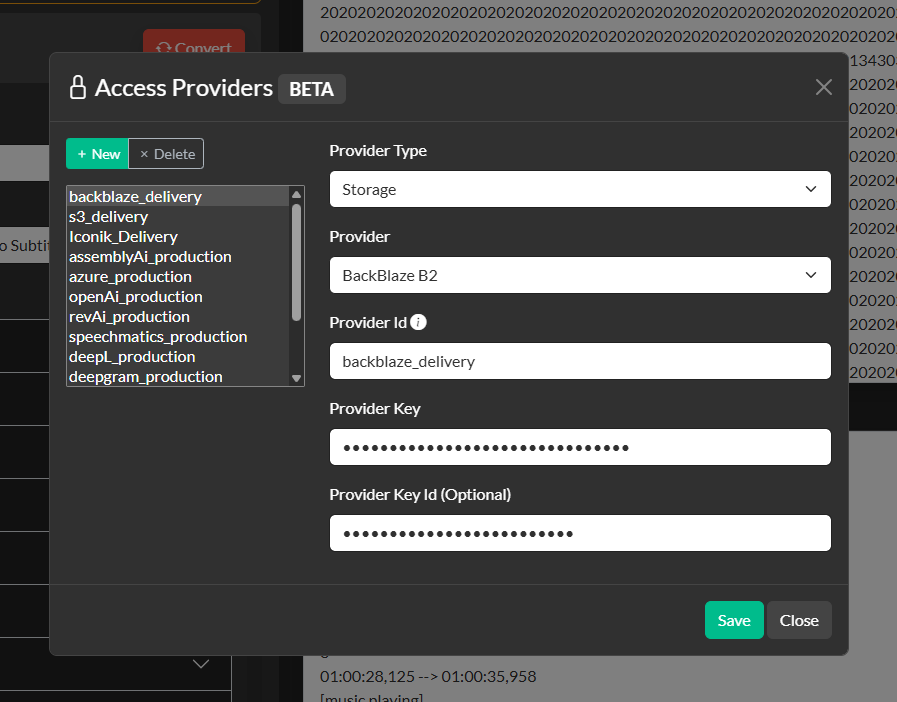
Access Providers are configured once in the Closed Caption Converter dashboard and then referenced by their assigned Provider ID in Job Descriptions. The dashboard stores your credentials securely and makes each configured provider available to your API calls by ID.
Access Providers unlock the following additional API job types beyond standard file conversion:
| Job Type | Requires | Description |
|---|---|---|
transcribe | Transcription provider | Sends audio or video to a speech-to-text engine and converts the resulting transcript into a properly formatted caption file. |
align | Transcription provider | Synchronises an existing caption or transcript file to audio/video content by using the transcription engine for forced alignment. |
translate | Translation provider | Translates the text of a caption file into one or more target languages while preserving timing and formatting. |
deliver | Storage or Platform provider | Delivers the output file directly to a configured cloud storage bucket or media asset management platform. |
Transcription Providers
Transcription providers support the transcribe and align job types. All providers receive audio from the media_path URL you supply in the Job Description and return speech recognition results in their native format. Closed Caption Converter's built-in transcription profiles then convert those results into a properly timed and formatted CCPRJ for encoding into your target caption format.
The key advantage of routing transcription through Closed Caption Converter rather than calling the transcription API directly is that raw speech-to-text output is not broadcast-ready. The platform handles segmentation (breaking long transcription spans into properly sized caption events), reading speed validation, format-specific encoding, and timing correction — producing a delivery-ready caption file from a single API call.
| Provider | Features |
|---|---|
| Deepgram | Industry-leading accuracy with support for speaker diarisation, utterance-level splitting, model selection (Nova, General, etc.), and punctuation. |
| Assembly AI | High accuracy with speaker labelling support. Well suited for podcast and interview content. |
| Speechmatics | Multilingual transcription with speaker diarisation and operating point selection (standard vs. enhanced). |
| Rev AI | Human-quality transcription API with speaker labels and confidence scores. |
| Google Speech-to-Text | Google Cloud speech recognition with broad language support and model selection. |
| Amazon Transcribe | AWS transcription service with speaker identification and vocabulary customisation. |
| Voicegain | Specialised ASR with support for real-time and batch workflows. |
| ElevenLabs Scribe | ElevenLabs' transcription API optimised for clean speech content. |
| OpenAI | OpenAI Whisper-based transcription through the OpenAI API. Supports multilingual content and language detection. |
Translation Providers
Translation providers support the translate job type. Closed Caption Converter does not pass raw text to translation APIs — it manages caption-aware batching to preserve sentence context across event boundaries, respects the character and duration constraints of each event, and ensures the translated output continues to meet the delivery specification's timing requirements.
| Provider | Features |
|---|---|
| DeepL | Best-in-class European language translation with contextual accuracy. Supports formal/informal tone selection. |
| ModernMT | Adaptive translation engine that learns from corrections over time. Well suited for specialised vocabulary domains. |
| Google Translate | Google Cloud Translation API with support for over 100 languages. |
| Amazon Translate | AWS translation service with custom terminology support. |
| Gemini | Google's Gemini model for high-quality translation with broad language coverage. |
| OpenAI | GPT-based translation via the OpenAI API. Particularly capable for nuanced or creative content. |
| Azure AI Translator | Microsoft Azure translation service, formerly Cognitive Services Translator, with document-level context. |
Storage Providers
Storage providers support the deliver job type. Instead of retrieving your output file from the Closed Caption Converter job results, you can configure the platform to write files directly to your cloud storage infrastructure. All provider-specific bucket and path configuration is passed through the delivery_options.provider_options object in the Job Description.
| Provider | Notes |
|---|---|
| AWS S3 | Deliver to any S3-compatible bucket using an AWS access key and secret. Also supports Backblaze B2 via the S3-compatible endpoint. |
| Backblaze B2 | Native Backblaze B2 delivery using the S3-compatible API driver. |
| Google Cloud Storage (GCS) | Deliver to a GCS bucket using a service account JSON key. Supports project ID and file path configuration. |
| Azure Blob Storage | Deliver to an Azure Blob Storage container using connection string credentials. Supports container and blob name configuration. |
Platform Providers
Platform providers go beyond file delivery — they integrate directly with the platform's API to register output files as assets or projects within the destination system, maintaining the relationship between processed caption files and their parent media assets.
Iconik MAM
The Iconik connector is the most widely used platform integration in Closed Caption Converter. When a job is submitted through the /iconik API endpoint, the platform automatically reads the subtitle files associated with the referenced Iconik asset, processes them according to your job parameters, and writes the resulting output file back to the same asset in Iconik. No manual file transfer or re-upload is required.
Setting up the Iconik connector requires two steps. First, configure your Iconik credentials in the Closed Caption Converter dashboard to create an Iconik Platform access provider. Second, create a Custom Action in Iconik that posts to the Closed Caption Converter /iconik endpoint. Once configured, jobs can be triggered directly from any Iconik asset — selecting the Custom Action sends the asset context automatically to the API, which handles everything from reading the source caption file through to writing the result back to the Iconik asset.
Closed Caption Creator
The Closed Caption Creator platform connector registers processed caption files as projects in Closed Caption Creator, the companion manual captioning and editing tool. This integration enables automated hybrid workflows: Closed Caption Converter handles the bulk processing (conversion, conforming, transcription) and the output is automatically queued as a review project in Closed Caption Creator for a human editor to verify, adjust, and approve before final delivery.
Configuring Access Providers
Access Providers are configured from the Access Providers item in the top navigation. To add a provider:
- Click + New and select the provider type from the list.
- Enter a descriptive name for the provider (this becomes the display label in the dashboard).
- Enter the required credentials (API key, access key/secret, service account JSON, etc.).
- Save the configuration. The dashboard will assign a unique Provider ID to the new entry.
The Provider ID is the value you use in provider_id fields within your Job Descriptions. Because credentials are stored server-side and referenced by ID, your API code never needs to contain raw third-party API keys.
For detailed instructions on configuring each provider type within a Job Description, see API — Access Providers.