Job Types & Descriptions
A Job Description is the JSON document that instructs Closed Caption Converter what to do with a caption file. It is passed as the config field in API requests, used by the CLI as a configuration file, and generated automatically by the web application when you configure and run a job. Every job — from a simple format conversion to a multi-step transcription and delivery workflow — is expressed as a Job Description.
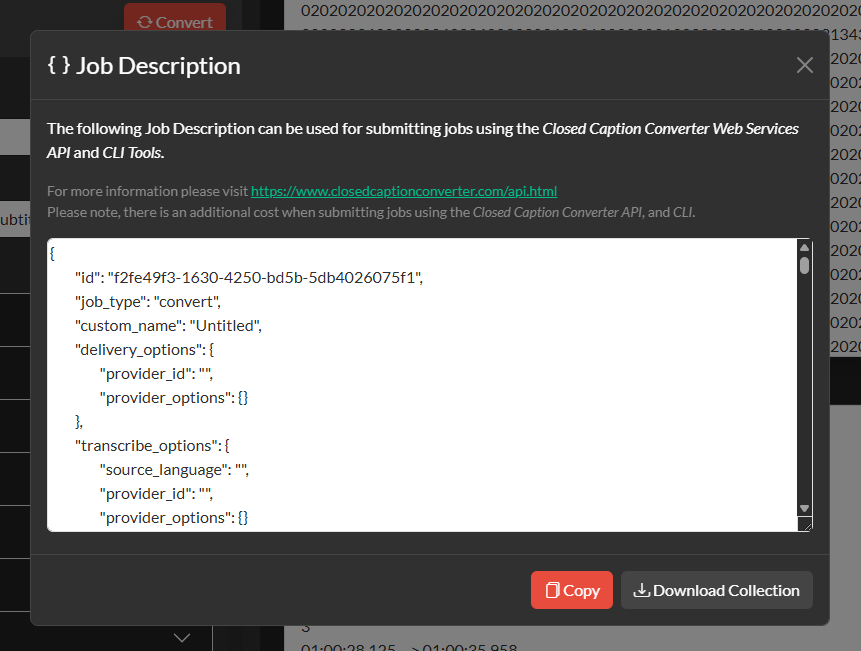
The web application's Job Description modal (accessible from the top navigation) shows you the exact JSON that will be sent to the API for any job you configure. You can copy it directly or export it as a Postman collection.
Job Description Structure
Every Job Description is a JSON object. The following table describes the top-level fields:
| Field | Type | Default | Description |
|---|---|---|---|
job_type | string | "convert" | The type of job to perform. See Job Types below. |
source_profile | string | "SubRip Video Subtitle Script" | The profile name used to decode the source file. Must match a supported source profile name exactly. |
target_profile | string | "SubRip Video Subtitle Script" | The profile name used to encode the output file. Must match a supported target profile name exactly. |
default_frameRate | number | 29.97 | The frame rate used when the source format does not carry frame rate metadata. |
default_dropFrame | boolean | true | The drop-frame flag used alongside default_frameRate. |
source_frameRate | string or number | "auto" | The frame rate to use when reading source timecodes. Set to "auto" to read from the file. |
target_frameRate | string or number | "auto" | The frame rate to write to the output file. Set to "auto" to match the source. |
offset | string | "00:00:00:00" | SMPTE timecode offset applied to all events. |
offset_type | string | "add" | Whether to "add" or "subtract" the offset value. |
incode | string | "00:00:00:00" | Programme start timecode. All events are normalised relative to this value. Set to "auto" to use the first event's in-time. |
encoding_options | array | [] | Format-specific encode options. Each element is an object with name and selected properties matching a target profile's available options. |
decoding_options | array | [] | Format-specific decode options. Each element is an object with name and selected properties. |
auto_format_options | object | see below | Configuration for the Auto Format filter. |
auto_correct_timing_options | object | see below | Configuration for the Auto Correct Timing / reading speed correction panel. |
event_gap_options | object | see below | Configuration for the Event Gap filter. |
remove_forced_subs | object | see below | Configuration for the Remove Forced Subtitles filter. |
searches | array | [] | Array of Search & Replace rules. |
segments | array | [] | Array of Segmentation & Conform segment definitions. |
qc | object | see below | Automatic QC configuration. |
media_path | string | "" | URL of the audio/video file for transcription or alignment jobs. |
webhook | string | "" | A URL that receives a POST callback when the job completes. |
delivery_options | object | see below | Output delivery configuration for storage and platform providers. |
transcribe_options | object | see below | Transcription configuration including provider ID and language. |
translate_options | object | see below | Translation configuration including provider ID, source, and target languages. |
Job Types
The job_type field determines which processing path the job follows. If you omit it, Closed Caption Converter defaults to convert. The five supported job types are described below.
convert
The standard job type for all format conversion and conform workflows. The source file is decoded using the specified source profile, any configured filters are applied in order, and the result is encoded using the target profile.
{
  "job_type": "convert",
  "source_profile": "Scenarist V1.0",
  "target_profile": "EBU STL",
  "default_frameRate": 29.97,
  "default_dropFrame": true,
  "encoding_options": [
    { "name": "Language Code", "selected": "English" },
    { "name": "Country of Origin", "selected": "Canada" }
  ]
}
transcribe
Sends the audio or video at media_path to a configured transcription Access Provider, receives the transcript, converts it into the CCPRJ format, applies any configured filters, and encodes the result to the target profile. Requires a transcription provider to be configured in transcribe_options.
{
  "job_type": "transcribe",
  "target_profile": "SubRip Video Subtitle Script",
  "media_path": "https://presigned-url-to/media.mp4",
  "transcribe_options": {
    "source_language": "en",
    "provider_id": "your-transcription-provider-id",
    "provider_options": {
      "model": "nova-2",
      "punctuate": true,
      "diarize": false,
      "utterances": true,
      "utt_split": 0.8
    }
  }
}
The provider_options object is passed directly to the transcription service. Refer to your provider's documentation for supported parameters.
align
Aligns an existing caption or transcript file to audio/video content using a transcription provider's forced alignment capability. Like the transcribe job type, this requires a media_path and a configured transcription provider. The source caption file provides the text and the transcription engine provides the precise timing.
{
  "job_type": "align",
  "source_profile": "SubRip Video Subtitle Script",
  "target_profile": "WebVTT",
  "media_path": "https://presigned-url-to/media.mp4",
  "transcribe_options": {
    "source_language": "en",
    "provider_id": "your-transcription-provider-id",
    "provider_options": {
      "model": "nova-2",
      "punctuate": true
    }
  }
}
translate
Translates the text of the source caption file into a target language using a configured translation Access Provider. Timing and formatting are preserved throughout the translation process. Closed Caption Converter handles caption-aware batching to preserve sentence context across event boundaries.
{
  "job_type": "translate",
  "source_profile": "SubRip Video Subtitle Script",
  "target_profile": "SubRip Video Subtitle Script",
  "translate_options": {
    "provider_id": "your-translation-provider-id",
    "source_language": "en",
    "target_language": "fr"
  }
}
Language codes are passed directly to the translation service. Refer to your provider's documentation for supported language codes and dialects.
deliver
When delivery_options are included in a Job Description alongside another job type (such as convert or transcribe), the output file is automatically delivered to the specified storage or platform provider after processing is complete. The response still contains the output file in the standard JSON response, and additionally the file is written to the destination.
{
  "job_type": "convert",
  "source_profile": "SubRip Video Subtitle Script",
  "target_profile": "WebVTT",
  "delivery_options": {
    "provider_id": "your-s3-provider-id",
    "provider_options": {
      "bucket": "your-bucket-name",
      "region": "us-east-1",
      "key": "output/captions/episode01.vtt"
    }
  }
}
Filter Configuration
Filters are configured as nested objects within the Job Description. Each filter has an enable flag that must be set to true to activate it, along with its specific settings.
Auto Format
"auto_format_options": {
  "enable": true,
  "max_lines": 2,
  "max_characters": 32,
  "min_duration": 1,
  "allow_orphan_words": false,
  "selective": true
}
Automatic Reading Speed
"auto_correct_timing_options": {
  "enable": true,
  "max_cps": 25,
  "min_duration": 1,
  "max_duration": 12,
  "min_frame_gap": 2
}
Event Gap
"event_gap_options": {
  "enable": true,
  "frames": 2,
  "min_gap": 0,
  "max_gap": 6,
  "shot_change_aware": false,
  "shot_changes": []
}
Search & Replace
The searches array contains one or more replacement rules:
"searches": [
  {
    "find": "colour",
    "replace": "color",
    "regex": false,
    "caseSensitive": false
  }
]
Segmentation & Conform
The segments array defines the regions to extract:
"segments": [
  {
    "incode": "01:00:00:00",
    "outcode": "01:15:00:00",
    "tcFormat": "smpte"
  }
]
Remove Forced Subtitles
"remove_forced_subs": {
  "enable": true,
  "remove": true
}
Set remove to true to remove forced events, or false to keep only forced events and remove all others.
Automatic QC
"qc": {
  "content": {
    "enabled": true,
    "maxChars": 84,
    "maxLines": 2,
    "maxCps": 25,
    "maxWpm": 250,
    "minEventGapFrames": 2,
    "overlap": true,
    "illegalChars608": false,
    "illegalCharsNetflix": false
  },
  "technical": {
    "enabled": false
  }
}