Encoding & Decoding Options
Encoding and decoding options are format-specific settings that control how a profile reads or writes a caption file. They appear automatically in both the web application and the Job Description JSON when a profile that supports them is selected. Options vary considerably by format — some profiles have no configurable settings at all, while complex binary formats like EBU-STL expose dozens of metadata fields.
In the web application, options appear as collapsible panels beneath the source and target profile selectors. In the Job Description JSON, they are passed in the decoding_options and encoding_options arrays respectively.
Some advanced controls that users may think of as filters are actually profile-specific encoding options. Examples include 608 Options, 708 Options, Embed Options, V-Chip Information, and Program Information. These only appear when the selected target format supports them.
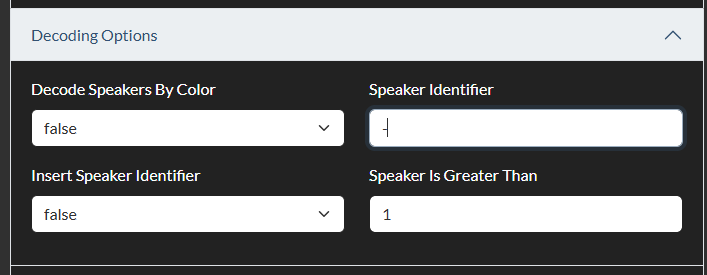

Decoding Options
Decoding options control how a source file is read and interpreted during the decode step. The most common decoding options are channel selection, metadata extraction, and control over which content layers are imported. The examples below are illustrative rather than exhaustive.
Scenarist (SCC) — Decode Options
| Option | Type | Default | Description |
|---|---|---|---|
| Channel | List | auto | Specifies which CEA-608 channel to read from the file. Options are auto, ch01, ch02, ch03, and ch04. When set to auto, the decoder reads the most populated channel. |
MacCaption 608/708 (MCC) — Decode Options
| Option | Type | Default | Description |
|---|---|---|---|
| Channel | List | ch01 | Specifies which caption channel or service to read. Options include ch01–ch04 (608 channels) and programA–programF (708 services). |
EBU-STL — Decode Options
| Option | Type | Default | Description |
|---|---|---|---|
| Decode Speakers By Color | List | false | When enabled, the STL colour attribute is used to identify different speakers and populate the CCPRJ speaker object. |
| Speaker Identifier | Text | (empty) | A text string used to identify speaker names within subtitle text. If the text of an event begins with this string, the prefix is treated as a speaker label and extracted accordingly. |
| Insert Speaker Identifier | List | false | When enabled, the decoded speaker name is prepended to each event's text in the output. |
| Speaker Is Greater Than | Number | 1 | The minimum number of characters a speaker identifier must contain to be recognised. |
Cavena 890 — Decode Options
| Option | Type | Default | Description |
|---|---|---|---|
| Decode Line 1 | List | yes | Whether to decode the first subtitle line track from the binary file. |
| Decode Line 2 | List | yes | Whether to decode the second subtitle line track. |
Text Transcript — Decode Options
| Option | Type | Default | Description |
|---|---|---|---|
| Max Characters Per Line | Number | 32 | The maximum characters per line used when segmenting a plain-text transcript into timed events. |
| Max Lines Per Event | Number | 2 | The maximum number of lines per event generated from the transcript. |
| Reading Rate | Number | 20 | The reading rate in characters per second used to calculate event durations from the transcribed text. |
| Split on Comma | List | no | Whether to create a new event at each comma. |
| Split on Punctuation | List | yes | Whether to create a new event at each sentence boundary. |
| Block Import | List | no | When enabled, imports paragraphs (blank-line-separated blocks) as single events rather than splitting by punctuation. |
Encoding Options
Encoding options control how the target file is written. They cover metadata fields required by the format specification, formatting preferences, channel assignments, and structural settings.
Scenarist (SCC) — Encode Options
| Option | Type | Default | Description |
|---|---|---|---|
| Channel | List | ch01 | The CEA-608 channel to write caption data into. Options: ch01, ch02, ch03, ch04. Use ch01 for the primary language and ch03 for a secondary language in dual-language deliveries. |
| Line Endings | List | unix | The line ending style of the output text file. Options: windows (CRLF), unix (LF), macintosh (CR). |
| Timecode Format | List | auto | Controls whether semicolons (drop-frame) or colons (non-drop-frame) are used in timecode strings in the SCC file. auto selects based on the job frame rate. |
MacCaption 608/708 (MCC) — Encode Options
| Option | Type | Default | Description |
|---|---|---|---|
| MCC Version | List | 2.0 | The MCC file format version to write. Version 2.0 supports both CEA-608 and CEA-708 data. Version 1.0 is a legacy option for older decoders. |
| Compress Output | List | yes | Whether to apply MCC's native run-length compression to the binary packet data in the output file, which reduces file size. |
EBU-STL — Encode Options
EBU-STL has the most extensive set of encoding options because the format mandates a large header block (the GSI block) containing programme and distribution metadata. All text fields in the GSI block can be populated directly.
| Option | Type | Default | Description |
|---|---|---|---|
| Display Standard Code | List | Open subtitling | The STL display standard: Undefined, Open subtitling, Level-1 teletext, or Level-2 teletext. |
| Double Height Characters | List | no | Whether to use double-height character rendering for the subtitle text. |
| Program Title | Text | (empty) | Programme title written into the GSI block. |
| Episode Title | Text | (empty) | Episode title written into the GSI block. |
| Translated Program Title | Text | (empty) | Translated programme title for the GSI block. |
| Translated Episode Title | Text | (empty) | Translated episode title for the GSI block. |
| Translator's Name | Text | (empty) | Translator name for the GSI block. |
| Translator's Contact Details | Text | (empty) | Contact details for the translator. |
| Subtitle List Ref Code | Text | (empty) | Reference code for the subtitle list. |
| Publisher | Text | (empty) | Distributor or publisher name. |
| Editor's Name | Text | (empty) | Subtitling editor name. |
| Editor's Contact Details | Text | (empty) | Editor contact details. |
| Language Code | List | English | The language of the subtitle content, written into the GSI language code field. Full list of EBU-defined languages is supported. |
| GSI Character Set | List | Multilingual | The GSI character set code. Options: United States, Multilingual, Portuguese, Canada-French, Nordic. |
| Character Code Table | List | Latin | The character code table used for subtitle text encoding. Options: Latin, Cyrillic, Arabic, Greek, Hebrew. |
| Country of Origin | List | Canada | The country of origin for the STL file's GSI block, selected from the full ISO 3166 country list. |
| SOM (Start of Message) | Text | 00:00:00:00 | The programme start timecode written into the GSI block. |
| Max Number of Rows | Number | 23 | Maximum number of subtitle rows, written into the GSI block. |
| Max Number of Characters Per Row | Number | 40 | Maximum characters per row, written into the GSI block. |
| Include Blank Subtitle At Start | List | no | When enabled, a blank subtitle event is inserted at the beginning of the file, which some STL systems require. |
Cavena 890 — Encode Options
| Option | Type | Default | Description |
|---|---|---|---|
| Line 1 Language | List | English | Language of the first subtitle track: Danish, Norwegian, English, Russian, Greek, Romanian, Swedish, Arabic, Hebrew, Traditional Chinese, Simplified Chinese. |
| Line 2 Language | List | English | Language of the second subtitle track. |
| Font Family Line 1 | List | auto | The font family code for the first track, corresponding to Cavena hardware font IDs. |
Text Transcript — Encode Options
| Option | Type | Default | Description |
|---|---|---|---|
| Include Speaker Name | List | no | Whether to prepend the speaker name to each event's text in the output. |
| Include Timestamp | List | no | Whether to include a timestamp at the start of each line. |
| Split On Event Gap | Number | 4 | The minimum gap in seconds between events that triggers a paragraph break in the output text. |
| Max Words | Number | 99999 | Maximum number of words per output file. |
| Event Prefix | Text | (empty) | A string prepended to each event in the output. |
| Event Suffix | Text | (empty) | A string appended to each event in the output. |
| Encode Formatting | List | false | Whether to include inline formatting codes (italic, bold) in the output text. |
TTML / DFXP / IMSC Variants — Common Encode Options
Most TTML-family profiles expose the following options where applicable:
| Option | Type | Default | Description |
|---|---|---|---|
| Language Code | Text | en | The BCP-47 language tag written into the TTML xml:lang attribute (e.g. en, fr, de, ja). |
| Timebase | List | media | Whether timecodes are expressed relative to media time (media) or wall-clock time (clock). |
| Title | Text | (empty) | The programme title written into the TTML metadata header. |
| Description | Text | (empty) | Description metadata written into the TTML header. |
| Copyright | Text | (empty) | Copyright string written into the TTML header. |
Passing Options in the API
When submitting a Job Description to the API, encoding and decoding options are passed as the encoding_options and decoding_options fields respectively. Each field is an array of option objects — the same structure returned by the GET /help/profiles/all endpoint. Every option object contains four fields:
| Field | Description |
|---|---|
name | The option name, matching the label shown in the web application. |
type | The input type: list, text-input, number-input, or textarea. |
values | For list types, an array of allowed values. For other types, an empty string. |
selected | The value to use for this conversion. Set this to override the default. |
The easiest way to construct the options array is to call GET https://api.closedcaptionconverter.com/help/profiles/all, find your profile, copy the decode or encode array from the response, and then set the selected field on any options you want to change.
The example below converts from EBU STL to Scenarist V1.0, using the ch02 channel on the target:
{
  "source_profile": "EBU STL",
  "target_profile": "Scenarist V1.0",
  "decoding_options": [
    {
      "name": "Decode Speakers By Color",
      "type": "list",
      "values": [true, false],
      "selected": false
    },
    {
      "name": "Speaker Identifier",
      "type": "text-input",
      "values": "",
      "selected": ""
    },
    {
      "name": "Insert Speaker Identifier",
      "type": "list",
      "values": [true, false],
      "selected": false
    },
    {
      "name": "Speaker Is Greater Than",
      "type": "number-input",
      "values": "",
      "selected": 1
    }
  ],
  "encoding_options": [
    {
      "name": "Channel",
      "type": "list",
      "values": ["ch01", "ch02", "ch03", "ch04"],
      "selected": "ch02"
    },
    {
      "name": "Line Endings",
      "type": "list",
      "values": ["windows", "unix", "macintosh"],
      "selected": "unix"
    },
    {
      "name": "Timecode Format",
      "type": "list",
      "values": ["colon", "semi-colon", "auto"],
      "selected": "auto"
    }
  ]
}
You do not need to include every option in the array — omitted options use their profile defaults. However, if you do include an option object, the entire object (including name, type, and values) must be present and accurate; only the selected field needs to differ from the default.